 EN
EN

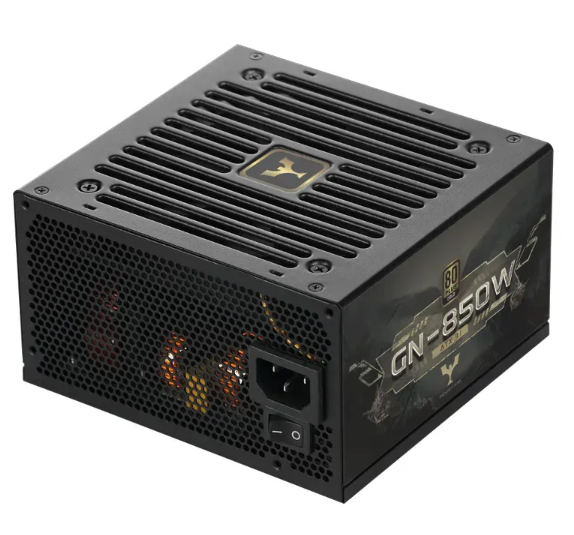
Introduction: The Role of a Reliable Power Supply Unit in System Performance
A power supply unit is the core energy provider for any computing system, converting AC power to stable DC power to drive motherboards, CPUs, hard drives, and other critical components. A well-maintained power supply unit not only ensures consistent system performance but also prevents hardware damage caused by voltage fluctuations or component failure. For users relying on durable and efficient power solutions, partnering with a professional manufacturer like Yijian—known for its high-quality power supply unit designs and rigorous production standards—lays the foundation for long-term reliability. This blog shares practical maintenance tips to extend your power supply unit lifespan, while highlighting how Yijian’s products are engineered to support these practices.
Keep the Power Supply Unit and Surroundings Clean
Dust accumulation is one of the biggest threats to a power supply unit’s lifespan. Dust clogs cooling fans, blocks airflow, and causes overheating, which degrades internal components like capacitors and transformers over time. Regular cleaning ensures the power supply unit operates within safe temperature ranges.
To maintain cleanliness, use compressed air to blow dust from the power supply unit’s vents and fan blades every 3–6 months. Ensure the surrounding area of the computer or server is free of dust, pet hair, and debris—avoid placing the system on carpets or in dusty corners. Yijian’s power supply unit designs incorporate dust-resistant fan filters and optimized airflow channels, making cleaning easier and reducing dust buildup. As a manufacturer with ISO9001 certification, Yijian prioritizes durability in its power supply unit production, using high-quality materials that resist dust-related wear.
Ensure Adequate Ventilation and Temperature Control
Overheating is a leading cause of power supply unit failure. A power supply unit generates heat during operation, and poor ventilation traps this heat, accelerating component aging. Maintaining a cool operating environment is essential for prolonging its lifespan.
Position your computer or server in a well-ventilated area with at least 10–15 centimeters of space around the power supply unit’s vents. Avoid enclosing the system in tight cabinets or placing it near heat sources like radiators or direct sunlight. For enterprise servers or high-performance rigs, consider using cooling fans or air conditioning to regulate ambient temperature. Yijian’s power supply unit models, including PC, industrial, and server power supplies, feature advanced heat dissipation technologies—such as high-efficiency fans and heat sinks—engineered to withstand continuous operation in various environments. With over 100 professional certifications, Yijian’s power supply unit is tested to perform reliably even in moderate temperature fluctuations.
Avoid Overloading the Power Supply Unit
Overloading occurs when the power supply unit is forced to deliver more power than its rated wattage, straining internal circuits and shortening lifespan. This often happens when adding high-power components like graphics cards or additional hard drives without upgrading the power supply unit.
To prevent overloading, calculate your system’s total power requirements before adding new components. Choose a power supply unit with a wattage rating 20–30% higher than your system’s peak demand to allow for future upgrades. Yijian offers a range of power supply unit options with varying wattages, from standard PC models to high-capacity server power supplies, all designed to handle stable loads. As a “National High-tech Enterprise,” Yijian integrates intelligent overload protection into its power supply unit designs, automatically shutting down or reducing power to prevent damage if the unit is overloaded.
Use Stable Power Sources and Surge Protection
Voltage spikes, power outages, and unstable AC power can damage a power supply unit’s internal components. Sudden voltage surges—caused by lightning strikes or electrical grid issues—can fry capacitors and transformers, while frequent power outages disrupt the power supply unit’s normal operation.
Protect your power supply unit by using a surge protector or uninterruptible power supply (UPS) to filter unstable power and provide backup during outages. Avoid plugging the power supply unit into overcrowded power strips, which can cause voltage drops. Yijian’s power supply unit products meet global safety standards, including UL, TUV, and FCC certifications, and feature built-in surge protection mechanisms to shield against voltage fluctuations. These design elements align with Yijian’s “quality first” business philosophy, ensuring the power supply unit can withstand harsh electrical conditions.
Regularly Inspect Cables and Connections
Loose or damaged cables can cause poor power transmission, leading to voltage instability and increased stress on the power supply unit. Over time, cables can become frayed, bent, or disconnected, affecting the unit’s performance and lifespan.
Inspect the power supply unit’s power cord, SATA cables, and PCIe connectors every 6–12 months for signs of damage. Ensure all connections are tight and secure, and replace any frayed or broken cables immediately. Yijian’s power supply unit models feature durable, high-quality cables with reinforced connectors, designed to resist wear and tear from frequent use. With over 20 appearance design patents, Yijian’s power supply unit also prioritizes cable management, reducing strain on connections and improving airflow within the system.
Choose a High-Quality Power Supply Unit from Reputable Manufacturers
The quality of the power supply unit itself is the most critical factor in its lifespan. Low-quality units use cheap components that degrade quickly, while high-quality models—like those from Yijian—are built with industrial-grade materials and undergo rigorous testing.
When selecting a power supply unit, look for certifications like 80Plus (for efficiency) and international safety standards. Yijian’s power supply unit products are certified by UL, TUV, 3C, CB, and other global bodies, with over 100 professional certifications to validate their quality. As a manufacturer integrating R&D, design, production, and sales, Yijian adheres to ISO9001 and ISO14001 standards, ensuring consistent quality across every power supply unit. Its “adhere to quality, advocate innovation, and win-win cooperation” development concept drives continuous improvement in product durability and performance.
Conclusion: Extend Your Power Supply Unit Lifespan with Proper Maintenance
A well-maintained power supply unit is key to a reliable computing system, and following these tips can significantly extend its lifespan. From keeping it clean and cool to avoiding overloading and using surge protection, simple practices go a long way in preserving performance. Choosing a high-quality power supply unit from a reputable manufacturer like Yijian—with its strict quality control, global certifications, and innovative design—further ensures long-term reliability.
Yijian’s power supply unit products, exported to over 10 countries worldwide, are engineered to withstand the demands of daily use and enterprise environments. By combining proper maintenance with a durable power supply unit, users can avoid costly replacements and ensure consistent system performance for years to come.
Table of Contents
- Introduction: The Role of a Reliable Power Supply Unit in System Performance
- Keep the Power Supply Unit and Surroundings Clean
- Ensure Adequate Ventilation and Temperature Control
- Avoid Overloading the Power Supply Unit
- Use Stable Power Sources and Surge Protection
- Regularly Inspect Cables and Connections
- Choose a High-Quality Power Supply Unit from Reputable Manufacturers
- Conclusion: Extend Your Power Supply Unit Lifespan with Proper Maintenance